

ProposalLift Open Source: A Self-Hosted AI Proposal Writer for Upwork
ProposalLift now has a free, open-source edition you can run on your own server. What it includes, how to set it up, and when hosted plans are the better fit.
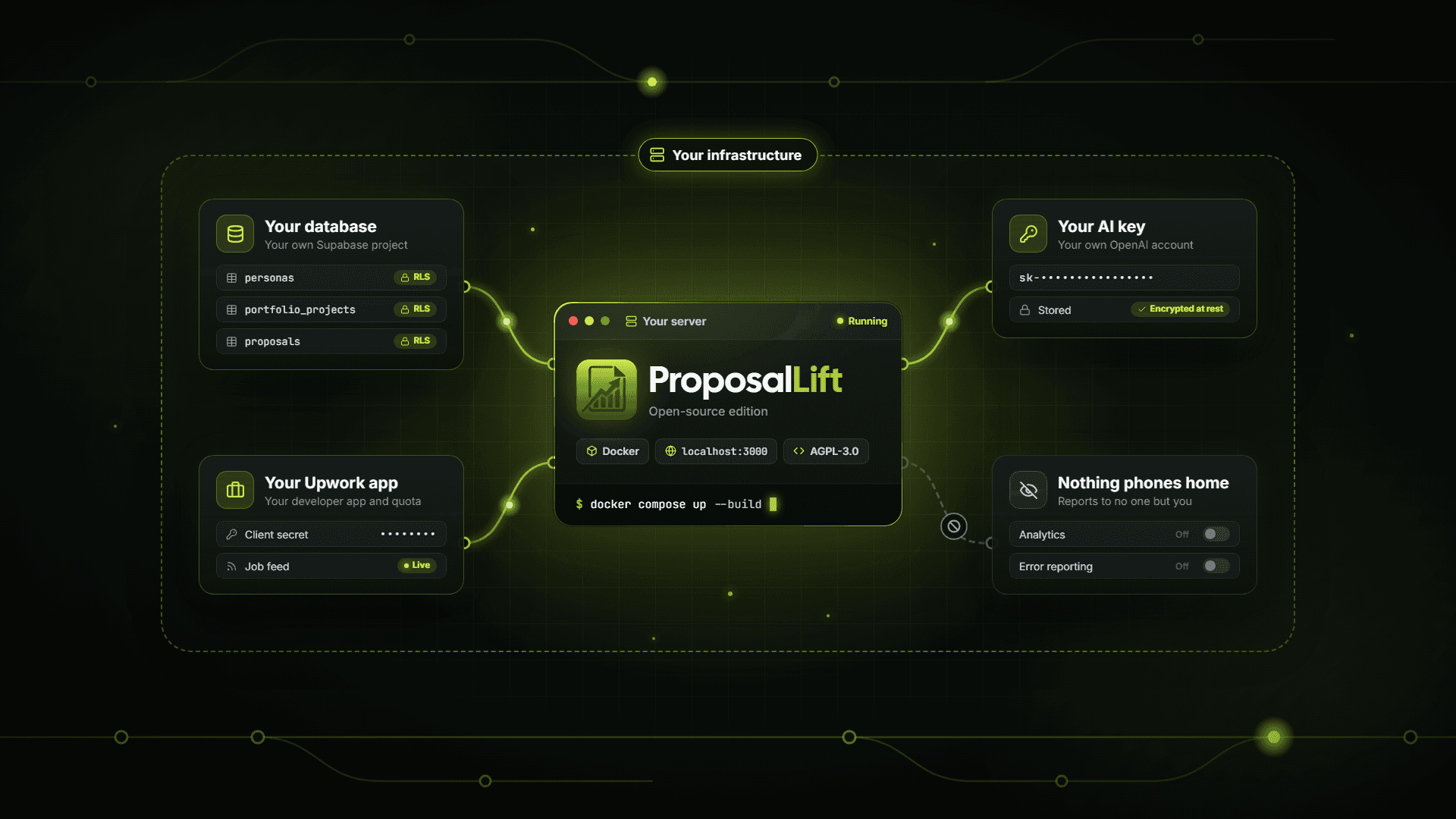
ProposalLift now has an open-source edition. It runs the same core workflow freelancers use on the hosted product: a live Upwork job feed, AI job qualification, and proposals written from your own personas and portfolio. The difference is that you run it yourself, on your own server, with your own API keys.
The code is public on GitHub at developios-git/proposal-lift-open-source, licensed under AGPL-3.0.
This guide is the full setup walkthrough. For a shorter overview of what the open-source edition includes, see the open-source edition page, and pricing compares it with the hosted plans side by side.
Before going further, a straight answer on who this is for. If you are comfortable with Docker, environment variables, and a Supabase dashboard, and you want full control over your data and costs, the open-source edition is a great fit. If you would rather spend that time sending proposals, the hosted plans get you to your first draft in minutes, with a 14-day free trial and no card to start.
This guide covers both sides: what the open-source edition includes, how it compares to hosted ProposalLift, how to set it up, and the trade-offs worth knowing before you commit an afternoon to it.
What the open-source edition is
The open-source edition is a single-user, self-hosted build of ProposalLift. Single-user means every account on an instance is fully independent. There are no organizations, teams, billing, or credits. Everything that exists to run ProposalLift as a paid service was removed, and what remains is the proposal workflow itself.
Three principles shape it:
- You own the infrastructure. The app runs in Docker. Your database, authentication, and storage live in a Supabase project you create and control.
- You bring your own keys. You register your own Upwork developer app and add your own OpenAI API key. There is no shared platform account behind the scenes.
- Nothing phones home. No analytics, no session recording, no error reporting. Your instance reports to no one but you.
Features
The open-source edition keeps the full loop: find the right jobs, qualify them, and write proposals grounded in your real experience.
Job discovery
- Live Upwork job feed driven by saved filters: skills, budget, client country, and experience level.
- Filters the Upwork API cannot express, applied after the fetch: competition level from applicant counts, freelancer location preference, and excluded keywords.
- AI job qualification. Describe the work you actually want in plain language, and each job in the feed is badged qualified or disqualified, so you can skip the ones that were never a fit.
- Applied-status awareness, read from Upwork rather than guessed.
Proposal generation
- Streaming drafts assembled from the job, your chosen persona, your most relevant portfolio projects, an opening hook, and optionally a template and your knowledge base.
- Portfolio matching by similarity. Your projects are ranked against each job with vector search, not keyword matching, so the proof in a proposal fits the job it is written for.
- Screening question answers generated alongside the proposal.
- Targeted edits. Refine a highlighted passage, or regenerate just the opening hook, without starting over.
- Model choice. An OpenAI key is required. Add an Anthropic key to use Claude as an alternative writing model.
Your writing context
Everything that makes a draft sound like you is stored in your own database and fed into every generation:
| Entity | What it does |
|---|---|
| Personas | Who the proposal is written as: name, role, bio, skills, and experience. Importable from your connected Upwork profile. |
| Portfolio projects | Past work, matched to each job at generation time and organized by categories and tags. |
| Hooks | Reusable opening lines. |
| Templates | Proposal skeletons with variables. |
| Knowledge base | Free-form context added to every generation. |
Delivery
- Chrome extension that drafts directly on Upwork's apply page. It fills the proposal box and answers the screening questions. It never clicks submit and never spends connects.
- Job alerts to a webhook (Make, n8n, Zapier, or any HTTPS endpoint) when new matching jobs appear. You set up the scheduler yourself, which is covered in the trade-offs below.
- Proposal library with status tracking.
Open source vs hosted ProposalLift
Both editions are built around the same workflow. The real difference is who does the operating.
| Hosted ProposalLift | Open-source edition | |
|---|---|---|
| Price | Pro $15/month or Agency $25/month, with a 14-day free trial and no card to start | Free software. You pay for your own OpenAI usage and hosting |
| Time to first proposal | Sign up and start | An afternoon of setup, plus waiting for Upwork to approve your developer app |
| AI usage | AI credits included with your plan | Your own OpenAI key, billed to you by OpenAI |
| Teams | Agency plan: invite members, shared library, organization billing | Separate accounts only, nothing shared |
| Hosting and security | Managed for you | Your server and your Supabase project, maintained by you |
| Updates | New features arrive automatically | Pull, rebuild, and apply new database migrations by hand |
| Where your data lives | ProposalLift's managed infrastructure | Entirely in your own Supabase project |
A simple rule of thumb: choose hosted if you want to send proposals today, work with a team, or have no interest in maintaining a server. Choose open source if you are a developer who wants to own the whole stack, audit the code, or build on top of it.
Why self-host?
For the right person, running your own instance has real advantages.
Your data stays in your database
Personas, portfolio, knowledge base, and saved proposals live in a Supabase project you own. Row-level security is enabled on every table, so accounts on the same instance cannot read each other's data. Job data from Upwork is never stored at all: the feed is read live on every load.
Your credentials stay on your server
Your Upwork client secret and your AI keys are encrypted at rest, under two separate encryption keys that only you hold. Your instance talks to Upwork as your own application, under your own API quota.
You control the costs
There is no subscription. Generation costs whatever OpenAI charges for what you actually generate, and a single user fits comfortably on Supabase's free tier.
You can read and change the code
The whole app is on GitHub. You can audit exactly what it sends to Upwork and to OpenAI, tune it for your niche, or build features the hosted product does not have. Under AGPL-3.0, if you run a modified version as a service for other people, you share those changes with them.
How to set it up
This is a condensed walkthrough. The README on GitHub has the complete version, including troubleshooting, and it stays current as the project changes.
What you need
- A Supabase account (the free tier is enough)
- An Upwork account that can register a developer app
- An OpenAI API key with billing enabled
- Git, and Docker Engine with Compose v2
You do not need Node installed to run it. Node 22 or newer and npm 11 or newer only matter if you want to work on the code.
Step 1: Create a Supabase project
Sign in at supabase.com, create a project in a region near you, and wait for provisioning to finish before moving on.
Step 2: Apply the database schema
In the Supabase dashboard, open SQL Editor and start a new query. Paste the entire contents of supabase/migrations/20260828000000_baseline.sql from the repository and click Run. That one file creates everything: tables, functions, vector search, and row-level security.
Two things matter here:
- Paste the whole file. Running it in pieces leaves a half-built schema, and the app gives you no useful error when that happens.
- Verify it worked. The Table Editor should show 18 tables. If you see fewer, reset the database and paste the file again from the top.
Step 3: Allow your app's URLs in Supabase Auth
Under Authentication, URL Configuration, set the Site URL to http://localhost:3000 and add http://localhost:3000/** to the Redirect URLs. Supabase only sends confirmation and password reset links to addresses on that list.
Hosted Supabase projects require email confirmation by default, and the built-in mail sender is heavily rate limited. For a private single-user instance, turning confirmation off is reasonable. For anything else, configure your own SMTP.
Step 4: Configure your environment
git clone https://github.com/developios-git/proposal-lift-open-source.git
cd proposal-lift-open-source
cp .env.example .env
Six values are required:
| Variable | Where it comes from |
|---|---|
NEXT_PUBLIC_SUPABASE_URL | Supabase Project Settings, API, "Project URL" |
NEXT_PUBLIC_SUPABASE_PUBLISHABLE_KEY | Same page, "Publishable key" |
SUPABASE_SECRET_KEY | Same page, "Secret key" (server-side only) |
UPWORK_CREDENTIALS_ENCRYPTION_KEY | Generate it with the command below |
AI_KEYS_ENCRYPTION_KEY | Generate a second, different one |
UPWORK_REDIRECT_URI | http://localhost:3000/auth/upwork/callback for a local install |
Generate each encryption key with:
openssl rand -hex 32
Set the encryption keys once and keep them. Changing either one makes everything already encrypted under it unreadable, and the affected credentials have to be entered again by hand. The .env.example file is heavily commented and worth reading for the optional values.
Step 5: Start the app
docker compose up --build
The first build takes a few minutes. When it finishes, opening http://localhost:3000 should land you on the login page.
The mistake that catches most people: any variable that starts with NEXT_PUBLIC_ is compiled into the app at build time. If you change one later, run docker compose up --build again. A plain docker compose up reuses the old image with the old value baked in, and nothing warns you.
Step 6: Create your account
Sign up with an email address and a password. If email confirmation is on, click the link in your inbox before signing in.
Step 7: Register your Upwork developer app
Go to upwork.com/developer/keys and create a new key. Set the callback URL to exactly your UPWORK_REDIRECT_URI, and enable these five permissions:
- Read marketplace Job Postings
- Client Proposals, Read And Write Access
- Freelancer Profile, Read And Write Access
- Talent Profile, Read And Write Access public
- Common Entities, Read-Only Access
Permissions come entirely from this form, so a missed checkbox does not fail when you connect. It fails later, as a permission error while the feed loads. Check them twice.
Approval can take a few days. Once your app is approved, copy the Client ID and Client Secret.
Step 8: Finish setup in the app
Sign in and open Get Started in the sidebar. Three steps are required before anything works:
- Add your OpenAI API key in Settings, AI Models.
- Add your Upwork Client ID and Secret in Settings, Integrations.
- Click Connect Upwork Account and authorize on Upwork.
Then create a filter, add a persona, and add your portfolio projects. The portfolio step needs your OpenAI key first, because each project is embedded when you save it, and that embedding is how it gets matched to jobs.
Open your filter, pick a job, click Generate, and your first proposal streams in.
Trade-offs to know before you start
Self-hosting is a real commitment. These are the points worth weighing honestly before you begin.
- Upwork approval runs on Upwork's schedule. Your developer app can take a few days to approve, and the feed does not work until it is.
- Job alerts need extra setup. Nothing schedules them out of the box, and the scheduler only works on a publicly reachable deployment, not on localhost.
- Signup is open. There is no invite-only mode. If your instance is reachable from the internet, anyone who finds it can create an account. They cannot see your data, but they can use your instance, so keep it private or put authentication in front of it.
- Updates are manual. Pull the latest code and rebuild, then paste any new database migrations into the SQL editor, oldest first. Never re-run the baseline schema on a live database.
- Moving to a public domain touches four places: your
.env, your Upwork app's callback URL, your Supabase Auth URLs, and a rebuild. Miss one and that piece fails silently. - Docker Compose is the supported deployment path. Other hosts may work, but you would be figuring them out on your own.
- It is built for solo use. There is no team workspace, shared persona library, or pooled usage.
Which one should you choose?
For most freelancers, the hosted product is the better use of your time. You skip the server, the Supabase setup, the encryption keys, and the migrations, and go straight to the part that wins jobs: sending sharper proposals. Start with the 14-day free trial, with no card to start.
If you work with a team, hosted is the way to go. The Agency plan gives you member invites, a shared library, and organization billing out of the box.
If you are a developer who wants to own every layer, audit what the code does, or extend it for your own niche, the open-source edition is yours to run. Star the repository on GitHub, follow the README, and open a pull request if you find something worth improving.
Frequently asked questions
Recent blog posts
 Apr 21, 2026
How to Write Upwork Proposals That Actually Get Hired (2026 Guide)
Learn how to write Upwork proposals that stand out: structure, proof, tone, and mistakes to avoid—plus a repeatable workflow serious freelancers use daily.
 Apr 20, 2026
Upwork Cover Letter Template That Converts (Copy-Paste Framework)
Use this Upwork cover letter framework: opening hook, proof, plan, and CTA—plus examples you can adapt so you sound credible, not like spam or a template.
 Apr 19, 2026
Freelance Proposal Automation: Smart Workflow (Without Sounding Robotic)
Use proposal automation the right way: research, snippets, checklists, and job feeds—while keeping every Upwork proposal specific enough to win consistently.